Avatar unwanted bumps

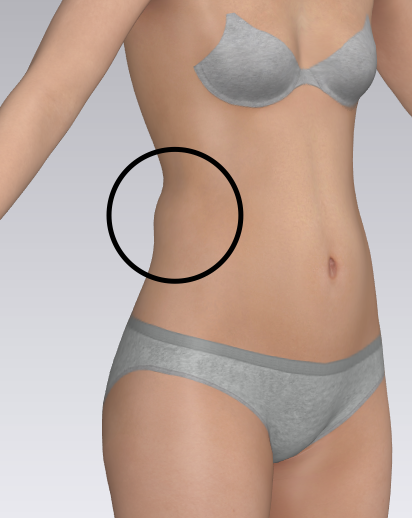 I've about gotten the hang of customizing avatar measurements and adjusting the skeleton to match my posture. The only problem I have is that no matter what I do, I can't get rid of this hump between the waist and high hip. It would be nice if we could customize additional circumferences to be able to fix problem areas like this or if it would smooth out between points. I'm not sure why it's assuming there needs to be a bump there?
If there's any kind of a work around, please let me know. Thanks
-
正式なコメント
kaldreasewingco, thank you for reaching out. This happens sometimes when a particular measurement is changed by a large amount or if you change it in the basic set of settings. Would it be possible to find out what measurements you changed and the amounts? Often it is also necessary to adjust another measurement to balance the changes.
-
That could be a mesh (avatar) weight map issue driving the smoothing of the body areas when you change the posture after adjusting the dimensions. I am a bit surprised it's making such a distinct bulge so that might be something you want to highlight to the CLO3D team, as it may be that the weight map for the avatar base or underlying bone structure is behaving properly when calculating the weightmap smoothing on the skin over the bone rig.
Could be a glitch in the avatars driving weight maps and bone rigging. Certainly needs a deeper technical look as that simply shouldn't happen and I have not noticed that in the previous version of CLO3D so maybe something changed here between versions to cause this qwerk.
1 -
Interesting CLO3D can insert a forum comment in front of my reply, I suppose that is where ultimate control comes in. 😃
Yes I have to agree with large changes in the avatar, and the order you run those changes as you make your custom avatar. It becomes a bit like 'whack-a-mole' and herding cats if you simply adjust dimensions one at a time, as the avatars sizes are 'relational', as CLO3D point out in their comment above.
So what I find from experience using their measurement toolset and what I know about anthropometrics (human dimension) is that you need to approach this systematically, then you will get a much better result, with less readjusting (tweaking) as you work.
The key dimensions I change on my 1st pass are the basic torso and posture related dimension's before I adjust limbs. The HPS high point shoulder is crucial, Crotch height is crucial as these 2 determine the torso length, hip, waist, bust heights all determine torso size so it stays within anthropometric relational norms.
This can mean one good check to ensure this is correct from the avatar to human measures is to use the torso vertical length from the HPS down over the bust to the crotch and over the back and back to the HPS as a total torso length as your ultimate guide your torso scale and shape is actually correct to your real body shape. That needs to be correct BEFORE you adjust posture, and it is often this total measurement that highlights in anthropometrics if one of the other 'girth' and height (eg: waist to bust line, waist to high hip) key measurements is out of whack.
So that is a single measure (total torso length) you can use to ensure your torso (the most critical area where measures can go wrong after posture is changed) is true to your measured body shape. Most notible is that this single measure passes through some key girths, bust waist hip, and then also verticle heights > waist to neck , HPS to apex, halter neck etc. Once you have the total torso length correct, and only then, adjust the posture. That should solve your bulge issue as it may be that you missed a critical length on the torso, whereby when you change the posture it simply tries to work within that relational mix. So I would get a tape and measure your torso length on yourself and then compare that with the avatar - bet they are not the same, and if not you need to check the lengths and key heights on the torso that led to that difference, and correct them before changing the avatar posture. Likely that is why this bulge happens it might simply be out of anthropometric scope.
1 -
 0
0 -
 0
0 -
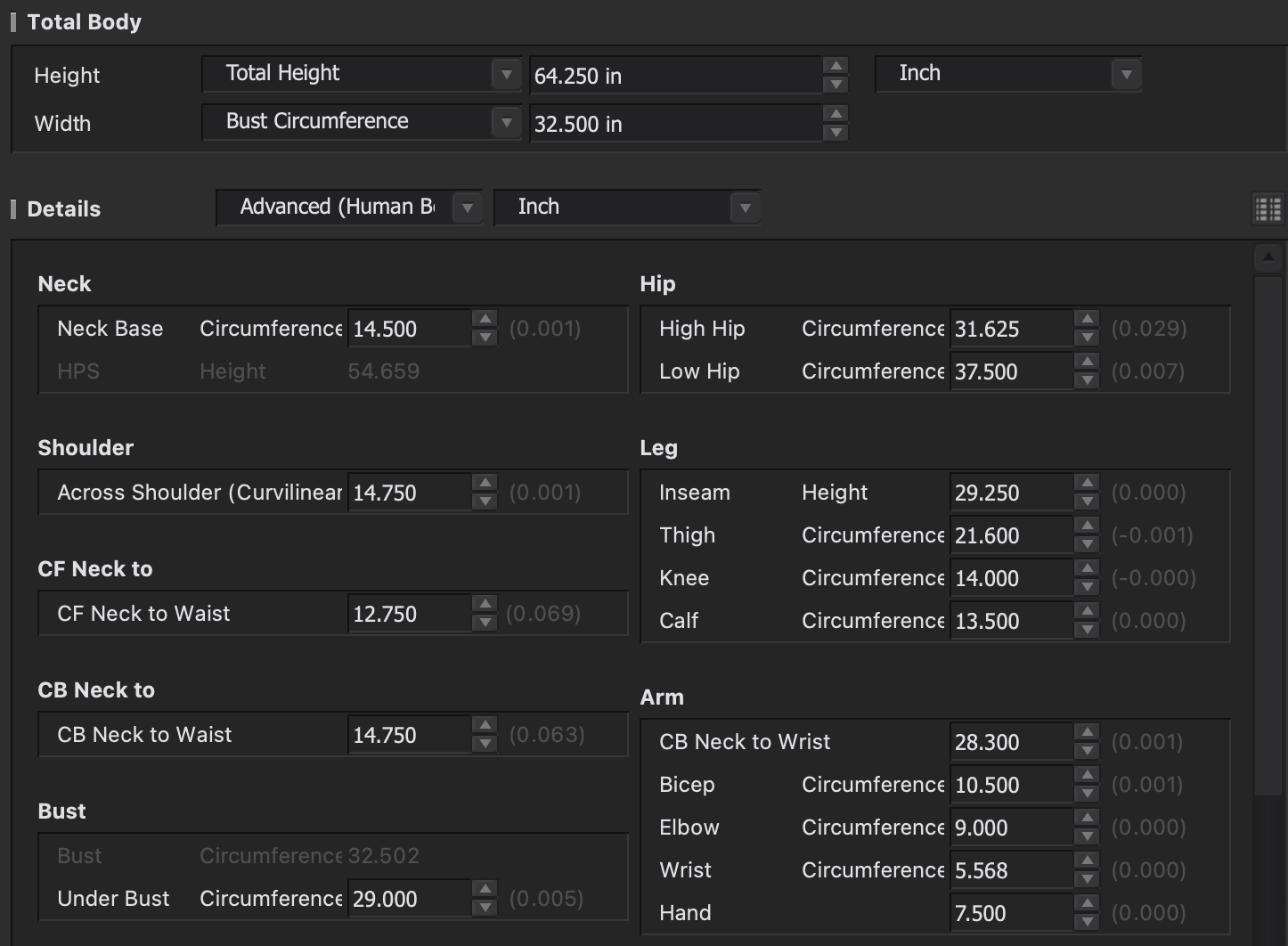
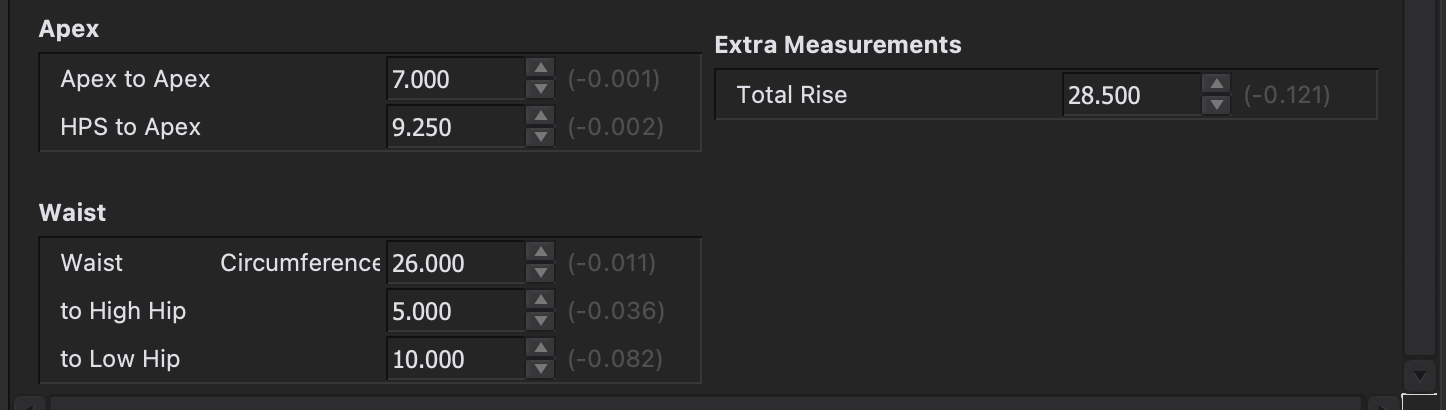
I attached the measurements above. My actual total rise is 29 but I decided to lower it because then it makes an unnatural bulge at the belly.
In response to the comments above, I have tried inputting the measurements in all kinds of orders to see if I could get a different result, but the result is always the same. I tried circumference first and then height measurements. I tried using the HPS height instead of the total height. I tried all height measurements first and then circumferences and all kinds of combinations in between, but that back bulge always happens. I even tried to input the measurements in the body form settings instead of human body measurements. Same thing always happens.
0 -
I will go back to my original comment (sorry CLO3D) and say this needs to be looked at. That's technical talk for - whoopsee on the weight mapping interpolation.
What I suggest as a workflow order > is make the avatar size adjustment's from the standard avatar to your size without changing the posture, then when it measures correctly, save the avatar as it should not have a budge at this stage in the process and then finally adjust the posture, if the bulge appears after you change the posture then CLO3D need to look at why.
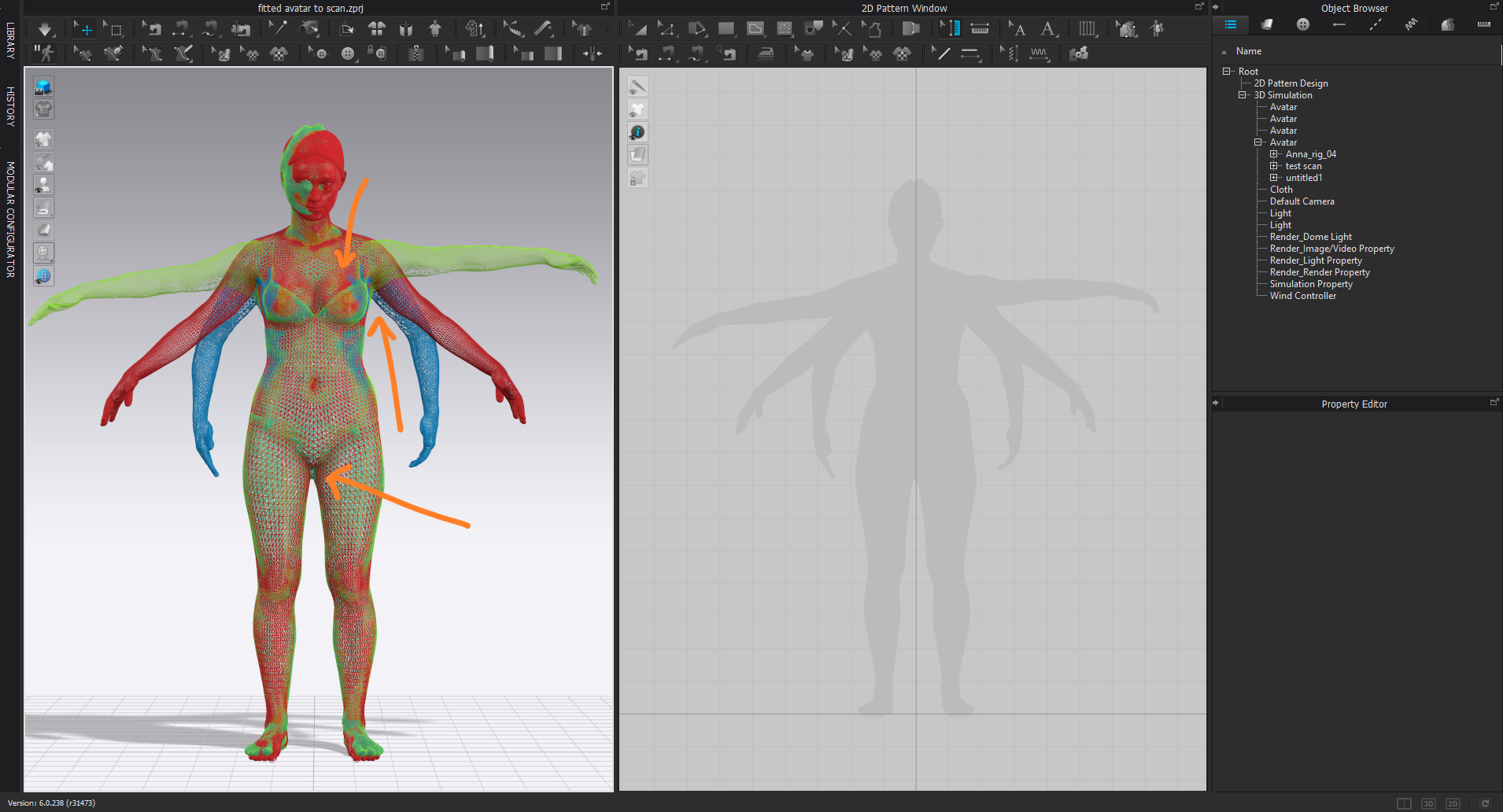
And in the meantime a high tech alternative that I use on site all the time with house models is to whip out my mobile phone, get the model to stand still for 3 minutes and race around them taking many quick snap shots, whack that into free photogrammetry software and get a 3D scan output in about 10 minutes processing. Then I simply scale that to a couple of key length and girth measures I take by tape on site, and use the CLO3D avatar to import scan process. I wrote a detailed post about that new technique in CLO3D v6 (see below) some time back when testing CLO3D v6 Beta, that's perhaps the best way to get a good human fit for any made to measure task.
I did do a detailed tutorial on this Avatar capture process into photogrammetry model ready for the CLO3D autofit to human scan feature (using the mobile phone camera ) but haven't published it yet, maybe in a few weeks if I can haul that up off my hard disk > you can get a very accurate avatar 3D scan 5mm accuracy if you factor in the lens distortion which is pretty basic to do these days as it's all calculated automatically. So maybe think about a photogrammetry process to get your body shape > way more accurate > then use the CLO3D avatar autofit to body scan feature. That might be less painful process, I use it all the time with other software and now that CLO3D v 6 has that feature maybe that is the way to go until they can fix that anthropometric 'love handle' bulge for you, that their software appears to be dropping in.
https://support.clo3d.com/hc/en-us/community/posts/360051825593-Importing-Body-Scans
 0
0
コメント