Missing Patterns when importing DXF

I am trying to import DXF files from a client, but only the front bodice is importing in. They claim there should be a complete set of patterns for the whole garment. I've tried opening the file, importing the file, and adding the file and it comes out the same way every time? Any suggestions?
-
I would try opening the file in another CAD software and checking if everything is there. I use share.padsystem.com with which you can get a free 30 days trial (no affiliation with them). Or use something like FreeCAD or LibreCAD to just check the file. There are some online DXF viewers too.
0 -
I viewed the file in Autodesk and there are other pattern pieces. So what might be causing CLO to not load all of the patterns?
0 -
There could be a various reasons. First one, are the pieces closed? I'm not completely sure if you see the pattern pieces in the software from Autodesk means that the pieces are closed.
Try importing into CLO with the swap stitching and cut line off. Again, check the files in a CAD software to make sure the shapes are closed.
0 -
Wonderful! turning the swap stitching and cut line off worked! Thanks for all the help!
0 -
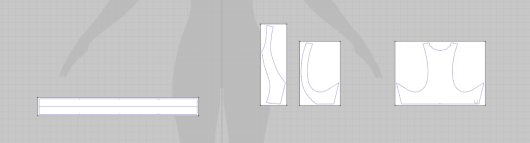
i'm having this problem too. the patterns was created in Optitex and exported to dxf. when I open the file in Ai, I see all the pieces and the shapes are closed. But when I import the dxf file into CLO, several pieces are missing. I've tried turning off the swap Stitching and cut lines but that didn't work. Any other suggestions?
This is what I should have:

This is what imports into CLO:
 0
0
コメント