Saving 3D arrangement

Is there anyway to save changes to the 3d arrangement of the pattern pieces?
I arranged my pieces so that they won't intersect when I simulate, but after I hit "reset 3d arrangement" some of the pieces reset to where they were before I adjusted them. So I would need to re-arrange them every time I simulate.
The solution I found is to delete the pieces and creating copies just so I can re-arrange them properly the first time. But there must be a faster way to do this that I'm just not aware of.
-
Hi lauraburt1
When adjusting the pieces are you using the Gizmo? If so they will not remember where they were moved to after selecting the Arrangement Point.
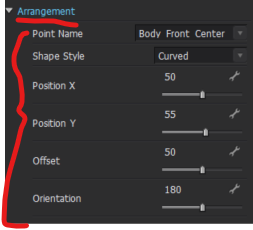
Instead if you want to adjust the position and for the piece to remember first assign the Pattern piece to an Arrangement Point > Then select the pattern piece that needs adjusting in 2D or 3D > Go to the Property Editor and scroll down to Arrangement > You can then use the Sliders to adjust placement, CLO will remember these movements when you choose Reset 3D Arrangement
 0
0
コメント