White shapes in render window when puckered seams overlap

I have made my own puckering for denim seams, works great except where these seams overlap (which is unavoidable in some places).
In the render window the overlaps create these weird white shapes.
How can I get rid of them?
Thanks
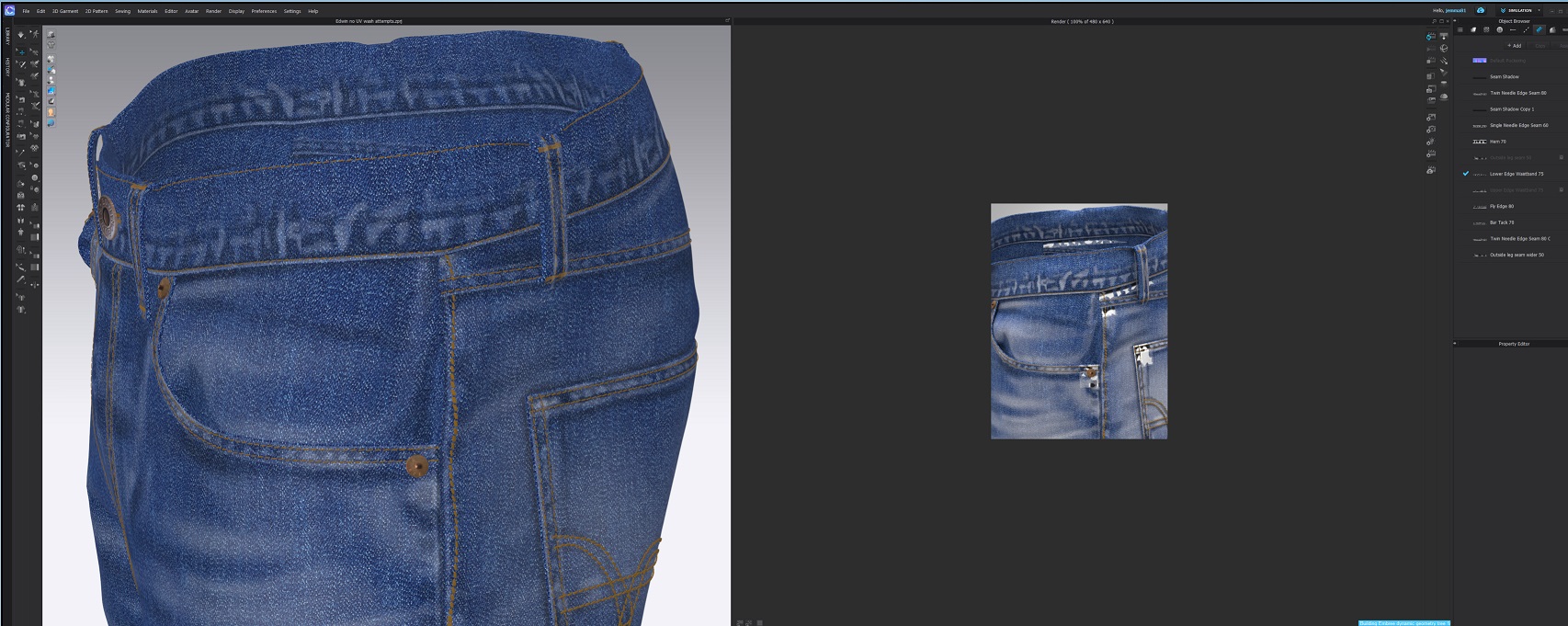
-
Hi, did you manage to solve this? I'm having the same issue, also with a denim jeans
0 -
Hi Katey,
Yes eventually I did!
You have to change the Z Offset for each overlapping seam, so that they all have slightly differing values.
With the puckering tool, click on one of the problem seams in the 2D window and you will see the corresponding Z offset value in the property editor.
I think the default seems to be 0.12 or 0.13mm. I changed an overlapping seam to 0.15mm and this solved the problem!
Hope this helps, let me know how you get on.
Jemma
0 -
Hi,
It worked a bit for me on the back pockets but otherwise not really - but you helped point out the problem was with my puckering thankyou! Finally figured it was happening everywhere the puckering had some overlap - maybe was a problem with how I created the texture files in photoshop but finally I restitched the puckering so there was no overlap and seems like the problem is solved.
Would be great if clo has a more detailed video on editing your own pucker, especially for denim, problem solved for now but im sure there is a better way!
thanks for your help Jemma!
0
コメント