Walk and smooth edge over seamline

Is there a known way or shortcut to smooth curved edges over seam lines when walking them? v6
Eg. If I have a bodice and shape the side seams in, then walk the pattern there is a sharp angle at the seamline at both the waistline and armscye. On a paper draft, I would take a french curve and smooth this. I can do exactly that for darts when using "shape dart cap" feature but seemingly no way to do this over a seam. Frankly the "walk pattern" tool seems fairly useless if I cannot make any changes to the pattern pieces beyond notching.
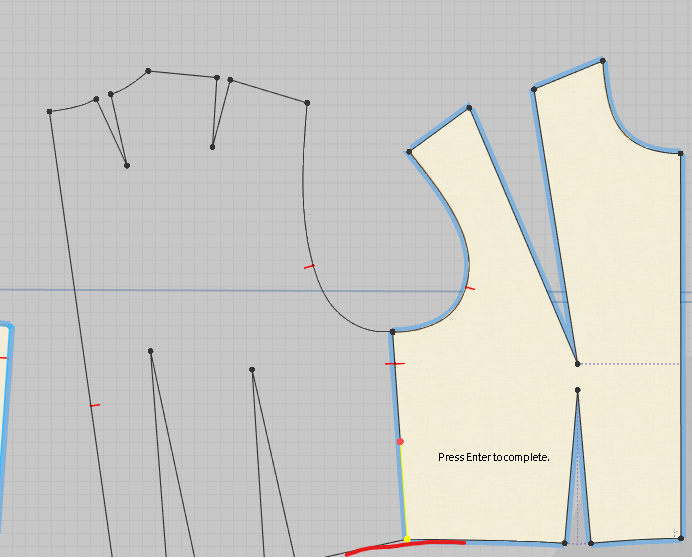
I've tried to find a few workarounds unsuccesfully
- Merge the two pattern pieces at just one point (the underarm point in the eg), thus creating one large pattern with a dart at the side "seam" that can be shaped. There is no way to have pieces merged at just a single pivot point like this.
- Merge the two pieces along the whole side seam. Then use the fullness tool to slash at the side seam and pivot out until the skewed half is back to grain. Create a dart along this fullness, shape the cap, and cut. I cannot find a way to accurately pivot (ideally snap) the skew piece to be back at the intended grain. This is also a lot of faffing about for something that I will likely be doing a lot
- Use the perpendicular corner tool. This would ensure a smooth line, but is not always appropriate. Sometimes the line I want will have an acute angle on one piece and an obtuse on the other.
-
Update: of course I found a workable method after posting this. I'll add it here to help others
- Mark a line as grain reference (I simply used CB and CF, but an internal line also works)
- Merge both pieces along seam. One will now be skewed - in my example, the bodice front
- Convert hard points to curve points, smooth and fix up as desired
- Draw seam back in and cut
- Right click on skewed piece > Rotate > Parallel to > Select a true grain line (eg. CB) > Select the skewed grain reference line (eg. CF)
- Skewed grain is now trued, and edges are smooth
A proper "shape seam" tool like the "shape dart cap" would be fantastic
0
Commentaires