Some features and tweaks I'd like to see.

So, I've been using Clo for about 2 years now and I made a list of things I'd really like to see, I've tried to list these from most important to least important.
1. When you have an internal line that extends to the pattern outline, and that pattern edge is sewn to another edge, there should be a snappable point on the other pattern piece that shows where the internal line intersects so you can easily line up internal lines across patterns.
2. When using pop up dialog boxes such as "offset pattern outline" or "add perpendicular internal line" or many others, the 2d pattern window and 3d pattern window are locked. You should be able to move around in the 2d pattern window while the dialog boxes are open, this is pretty important to be able to see what you're doing.
3. You should be able to "add perpendicular internal line" to multiple vertex's at once
4. Being able to offset internal lines from both directions at once.
5. When you're using the scroll wheel to change the offset internal line length it should stop at 1 and not 0.6. (I almost made this #1....)
6. There should be a "match up" option in the "edit sewing" right click menu
7. More options for "selecting all with the same property" Things like selecting all internal lines with the same length, or shapes that are all the same size and shape. Selecting internal lines with the same property should apply ONLY to the selected pattern pieces.
8. With the "layer clone over/under" instead of having one big circular sewing around the outline you should have the sewing divided up by the segment points.
9. Likewise I'd like to see more options with the Layer clone tool, like having right click options for whether you want the pattern instanced or even sewn together at all.
10. I'd really like to be able to link multiple sewing lines together manually.
11. On "offset pattern outline" the "create internal line" checkbox should remember the option you pick, and stay on or off until you manually change it, or just be "on" by default
12. Also when offsetting the pattern outline, the sewing extends with the pattern outline, if there was an option for the sewing to remain on the original line, that would be super awesome.
13. I LOVE the trace tool, but it could be better. I'd love to see a function similar to the 3d pen/flatten function, It would work like this- with the tool selected, in the 2d window, when you hover over a pattern and the section would turn blue, divided up by internal lines/edges holding shift would let you select multiple, and clicking would create a new pattern in that shape. That way it would take away the tediousness of selecting a bunch of edges. Also I'd like to see that pattern created right on top or bottom in the 3d window similar to how layer clone over and under works.
Thanks for reading!
-
Hi! Thank you so much for taking the time to list out everything here. We will forward your feedback to the team. Thank you for being such a amazing Clo user!
Regarding #13 you mentioned the tediousness of selecting multiple edges using the trace tool. Have you tried to R-Click in the background of your 2D window to lock pattern outlines and then select Internal or Base lines with your marquee? This may be a great time saver
0 -
I actually really like being able to lock pattern outlines and internal lines, it makes it SO much easier to select vertexes that are overlapping other vertexes or moving pattern outlines without moving internal lines, it's one of my favorite features you guys added. Unfortunately most of the time when I'm tracing I'm combining internal lines with pattern outlines so it doesn't save much time to lock the pattern outlines.
0 -
Ok, two more suggestions -
1. I'd really like to be able to lock the particle distance on certain pieces like belt loops and small pieces like that, because I'm switching between high and low quite a bit as I work, and a lot of times I don't want those small pieces to be affected when I select all and change the particle distance.
2. The ability to split sewing lines based on segment points, for example if I want various sewing tensions on a single seam I have to divide up the line and then sew separate segments. it would be really helpful to just add the segments and then have an option for the sewing to divide right at the segment points.
0 -
ONE more.
So, I've been using incorporating focus zoom into my workflow a lot more and it's pretty good, but most of the time I'm using it to select a small piece in the 2d window so I can zoom in on that piece in the 3d window. The problem is, when I hit the F key it zooms in on the 2d window only, and I have to be careful to remember to MMB click in the 3d window, because a left click would deselect the piece. I think it might be good to combine the 2d and 3d window focus zoom or separate the function into 2d and 3d window options.
0 -
Hi Jetsetgeometry (Great name by the way). Thank you again for so much feedback. We have forwarded everything to our Dev Team
1 -
Well..... It looks like I'm just going to keep posting stuff here...
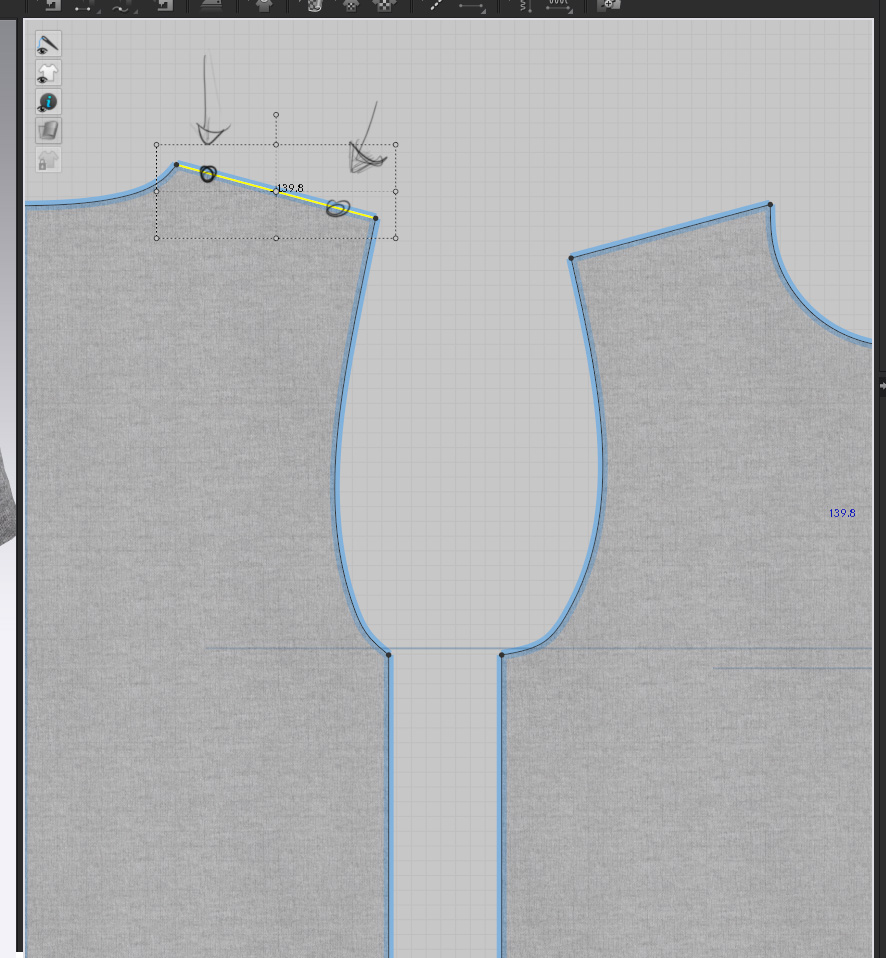
Anyway, I use the "Transform Point/Segment" tool a lot, and one of the ways that I use it very often is to rotate a line, and I almost always rotate from the segment point on either side, I do this especially when I need to slightly adjust the shoulder slope or the side seams and I don't want to change the segment length. Unfortunately the process is tedious, you have to double click the pivot and then move the pivot and then use handle in the middle to rotate which isn't very precise. What I think would be really helpful is in the Transform Point/Segment box, you would have 2 points on either side of the segment that would automatically rotate the line from the opposite segment point, like this-
 0
0 -
Thanks for your additional feedback.
0 -
Ok. So, I was working on a project the other day and I realized that whenever I manually input a measurement in a dialog box (Create Rectangle, Split Line, Offset Pattern Outline etc.) I almost always use a measurement of a segment or multiple segments already in my pattern. So, what would be helpful is something like this- when you have the dialog box open and the number highlighted, you could just select a segment(s) in the pattern and it would autofill that length into the box. It would be especially helpful when you need to make a straight line that matches the length of a curved segment, and it would also really help the workflow because you're not taking your hand off your mouse to input numbers and trying to remember lengths, and inputting numbers is generally just not fun.
0
Commentaires