CAN'T LOGIN

I switch sometimes from my PC to laptop. Now when I want to login, both says that my licence is already used by a diffrent account.
I can't login on both of my divices. Can somebody help me, as I like to CLO today :)
Thanks!
Susanne
-
Susanne, you can't use your individual license in two different computers at the same time. You have to quit one application (make sure when quitting the license is deactivated and that you are connected to the internet) and then open it in another computer.
In Windows you can have more than one instance running at the same time in the same computer.
0 -
Hi Pablo,
I have the same issue, except I'm not trying to use both at the same time. My laptop is turned off, and still I get the error message on my desktop. I sometimes have to travel for work and now I'm paranoid that I'll want to log onto my laptop and can't because I didn't deactivate the license on my desktop computer before heading out!
Is there a way to fix this? Is there a remote "log off from all computers" option on the website?
Thanks,
Anne0 -
Anne, you have to close one application before opening the other one. To be completely sure you can deactivate the license before closing:
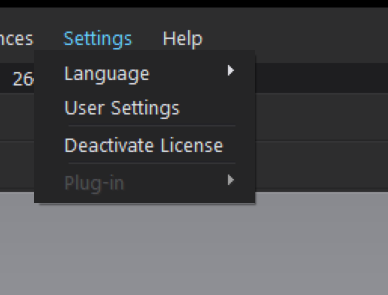 0
0 -
Pablo, thanks for the quick response. The problem is that I can't even get into the program, so I can't deactivate the license. I get the same error message on both my laptop and my desktop computer! I've even tried changing my password in the hopes that it'll kick me out of both, but no luck.
Isn't there any way to remotely deactivate the license? Adobe has that functionality - both on their website and when you want to open the program on a new computer. Then you have the option to log off of a different computer.
I desperately need this problem solved ASAP since I'm a freelancer who makes her money using the software. I'm happy for any help!
0 -
I reached out to customer service and John was able to manually reset it for me. Thank goodness! I hope they enable that option for us users soon.
0 -
I downloaded clo3d but why cant i log in ? say is wrong but not
0 -
help !!!
0 -
Hi didematalay. We need more information to assist you. Did you purchase a license or are you using a 30 day trial? What is the error message that you are receiving when you try to login?
You can also reach out to us directly on our Contact Us Page for login issues.
0 -
I've been enter my id and password.
After I click the login button it said "Invalid information. Please check and try again."
And I enter the correct password.
What should I do?
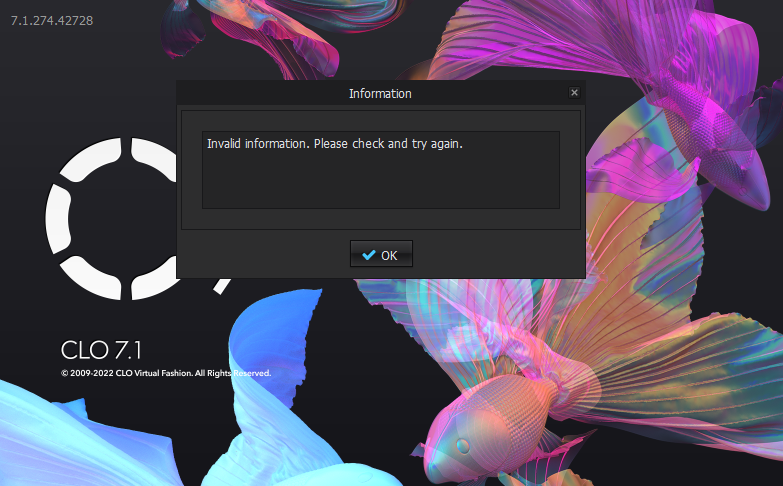 0
0 -
Hi baffac
I took a look at your account. While you have made an account on CLO3d.com it does not look like you have purchased a license yet. You will need to purchase/choose a license plan before being able to launch CLO
0
Commentaires