Copy grading from one point to another

Hi!
I often have the wish to copy grading from one point to another. Any possibility to do that?
Say I have a graded jacket, now I want to apply grading to another jacket I have and the grading rules are basically the same. To write them in by hand is very time consuming, would be great if one could just copy the values from one point to another.
/Linnea
0
-
@linnea , for now, unfortunately, there is no "easy" way of copy and pasting the grading values.
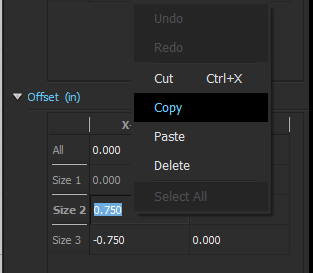
However, you can copy & paste individual grading rule value to another...!! You can do so by clicking the pattern outline with the the Grading tool > navigate to the Property Editor > double click to activate the offset or distance value > Ctrl+C > paste to the desired field.
 0
0
Commentaires