Messed up Seam Allowance while Importing/Exporting DXF AAMA

I have a problem with exporting DXF AAMA file with correct Seam Allowance shape. Especially in the corners and hemline where SA is getting curved instead of straight line.
Patterns before exporting made in CLO:

Patterns after exporting: It happens with AAMA as well as ASTM format
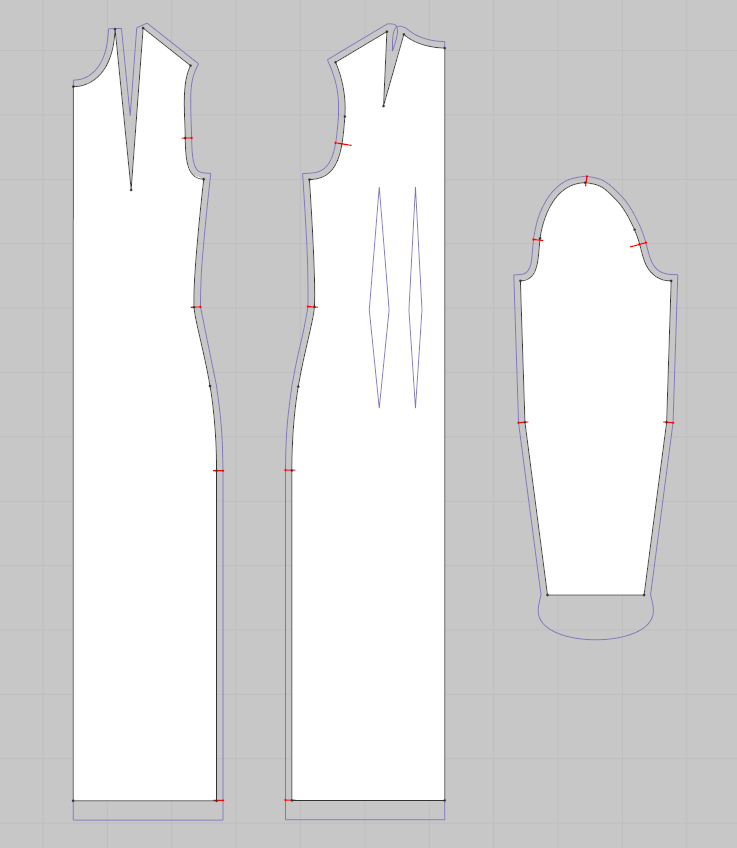
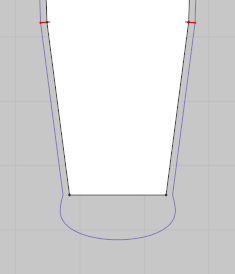
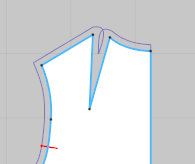
The hemline on the sleeve and back shoulder dart - its getting troubles after I used different seam corners as default ones.
Also the notches are shown only on few places on sewing line.
Anybody who exprienced something similar or knows whats wrong with it ?
Thanks a lot
Marcel
-
What system are the DXF-AAMA files coming from ?
0 -
I made patterns in CLO from scratch then i exported them as DXF-AAMA. When i re-opened them again in CLO ( as imported dxf files) the seam corners were no longer as i made them in original CLO file. Does it make sense?
0 -
If you need to re-import the same DXF > Save an additional DXF > toggling on > Convert curve point to straight point (AI only). Then when you re-import that DXF don't select any of the options and just delete the AI bounding sheet and it should get rid of the curved point handles you get for some curved lines.( I don't recommend that as a practice as it's maybe a false sense of what good CAD data archiving practice should be.)
If however you are passing onto a DXF Fashion CAD system export your DXF for that system. Generally there is no need to re-import a CLO3D export as you have all your origination work in CLO3D, so that is not exactly the right workflow as you are dumping data as DXF formats vary between systems, so you should only use that format export when you need to talk to other systems with the pattern where and when you need to - otherwise keep the garment and pattern in the CLO3D native formats.
The goal is to always work in the native format for your software system if you want to maintain data integrity at it's highest level > at which point you shift from that approach you have the potential to introduce interpolation errors which is never a good thing. Where possible archive in the native CAD systems format as the data integrity is then captured relative to the system you authored (created) the garment design in and that version of software. That is perhaps the best practice.
So if you are doing that to test the integrity of the DXF that would not be a good method. You should check that with the next system only that you pass the CLO3D DXF output onto - as you are basically passing the original CLO3D project through a DXF data interpolation out that is only geared to other systems - and then you are also attempting to bring it back into the same system, again under interpolation - which is not ever the correct practice if that is not the software's native format (which for CLO3D it is not) , you are not checking anything by doing this if that was the intent > other than how you are reducing down data integrity through using the wrong procedure from your CAD systems native CAD format which might then introduce another systems translation (DXF-AAMA) error due to reduction in data > So to retain a patterns data integrity at all time with CLO3D CAD you should archive your work only in the native CLO3D formats of > .zprj , .zpac, .pacx formats.
If you want to keep the CLO3D data in tact at the highest level of CAD integrity you should save as a CLO3D project (.zprj) > or as the CLO3D garment (.zpac) > or as the CLO3D pattern (.pacx ) formats and import it back in as a CLO3D native file format item as I just listed and if you export parts (pattern pieces) or just a garment without the additional data like avatar etc, you should use the appropriate native CLO3D garment file format to do that when archiving work. eg: CLO3D pattern only >archived as pattern in the .pacx format verse the entire 3D project sample assembly format. So understanding what formats to use is maybe based on how you align your digital assets for leveraging productivity (eg: 3D sample assemblies verse drafted flat patterns)
When exchanging between different CAD systems only use the appropriate data transport export that works with that system eg: (DXF-AAMA). That is a far more robust approach and you will not get any data loss of CAD data due to unnecessary interpolations issues.
0
Comentarios