RENDERED COLOURS ARE WRONG/DESATURATED

Hi All!
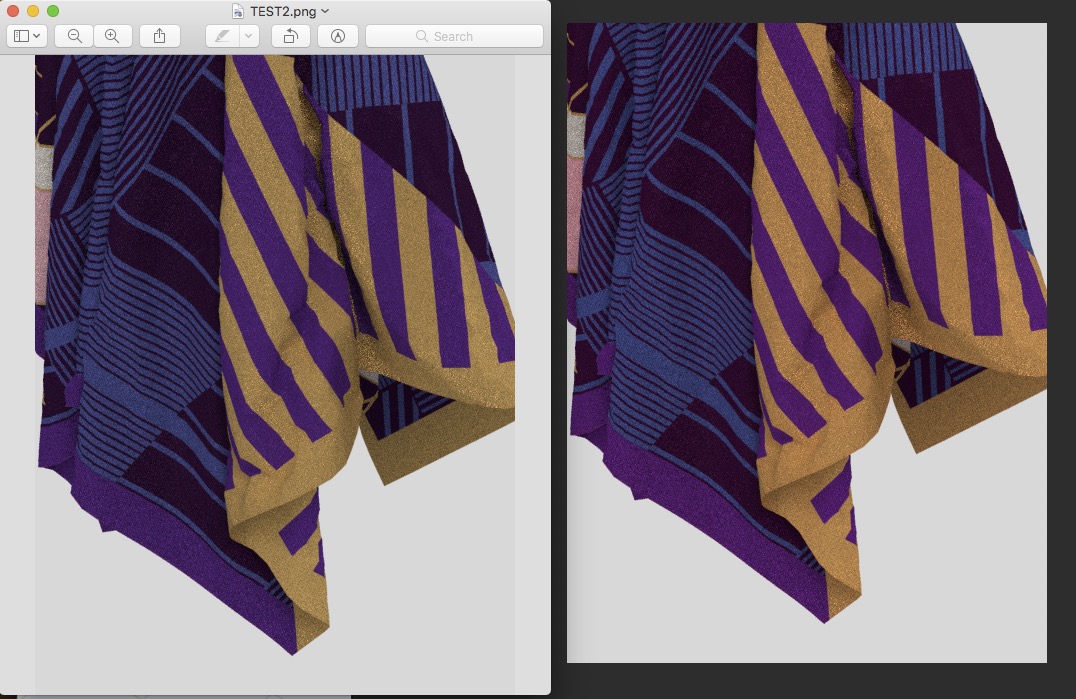
Does anyone know if there are export settings for colour after a render? When I render an image and save the image as either a JPG or PNG, the colours of the saved image are always completely different to the final rendered image inside CLO.
I've taken a screen grab here to show what I mean - I stopped the render early as I just want to demonstrate the colour shift so the image is pixilated. The image on the right is the rendered image as it looks on CLO interface - correct/perfect colours, and the image on the left is the saved/opened PNG of the render. See how the colours on the saved render are really nothing like the render inside CLO??? Any ideas anyone?
I don't see any colour preference plane inside CLO or any export colour settings. I can obviously fix the colour in post, but it's a bit of a bug/pain if thats the only route.
Any clues welcome!
-
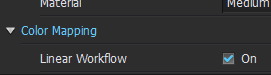
Hi odellin. Can you check your render color settings?
 0
0 -
Hi Pablo,
I have tried rendering with and without Linear Workflow ticked/unticked and I get the same result in the final PNG output file - it is nothing like the Rendered result I see inside CLO, there is a distinct colour shift (desaturation) of the image when it is saved as either PNG or JPG.
I assumed that having the Linear workflow ticked, would mean the colour workflow is set up for post production colour grading - and therefore/obviously you would expect to see a 'flatter' less saturated image. BUT, in actual fact, the output PNG file for the image that had Linear Workflow unticked, was an even more colour shifted image and even more desaturated (and darker!) than the out PNG Linear workflow image.
I think this is a bug in the program. Something is happening with the colour profiling when CLO is outputting the render to JPG or PNG.
0 -
My computer is super busy with other tasks so I can't output good quality renders, but here I just wanted to show the differences in images produced. Nothing has changed in the scene - the image in the middle is the render inside CLO - it is paused and then output as a PNG, the image on the left is the PNG file with None Linear workflow, and the image on the right is the PNG with the Linear Workflow.
I can expect a slightly different looking image from the Linear output file, this would be normal in Linear workflows - for post colour grading.
But, it is striking how VERY different the lighting is in the Linear output PNG - it is much much brighter.
The none linear output PNG on the left is closer to the Render inside CLO (in the middle) but the colour is still way off. Look at the difference in colour of the background, the strong yellow and the pink stripes. It is completely different to the CLO render.
Is it me? Am I doing something wrong? I had the render settings for both light and material set to low, but both these settings should have zero effect on colour. Colour workflow is critical for me so I'm crossing my fingers this is something I am doing and not the program! HELP :(
Thanks in advance if anyone has any tips.
 0
0 -
Just updating this as I figured out a solution and thought it might be useful to anyone experiencing the same colour shift issue:
AFTER EXPORTING THE RENDER AS A TIFF, OPEN THE IMAGE IN PHOTOSHOP, THEN:
EDIT>ASSIGN PROFILE>ADOBE RGB (1998)
This will get your colours looking how they did in CLO, and you can then do a final export from Photoshop depending on what output you require (for web, print etc)
Good Luck!
0
Comentarios