Hardware & Trims - totally empty!

I just purchased a license in February 2021, and I noticed now that my Hardware and trims folders are entirely empty, except for the button and topstitch folder. No buckles, cords & cord ends etc, I even navigated to each folder on my compute to double check and it says the folders are empty. I went to check if I could download them from the CLO-SET marketplace, but they seem to have removed all the trims from the store now :( Are they making you buy from 3rd party vendors now??
I know these trims & hardware used to be part of the default set up, so I'm bummed they are all gone (and I really need them right now!)
Thankful for any tips/advice you may have!
-
Hi emmalisae. The files are should be there, but they might not have downloaded or linked properly.
There are two things to check. The first is to make sure everything has been downloaded and updated. Check your library in the upper Left corner. If there is a blue dot next to any of the files there it means there are updates. Select the download button there.
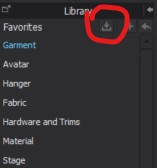
Second, is the relink them. For this you will need to find them on your computer.
To do this Right click on one of the empty files and select Copy the Path.
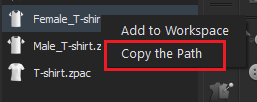
Then click the Plus button in the Library
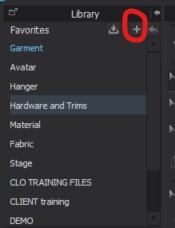
Paste the Path in the pop up and choose Select Folder
The files should now be relinked
0 -
Thank you SO much for the help! This worked! :)
0 -
So happy to hear that!
0
Comments