normal map issues

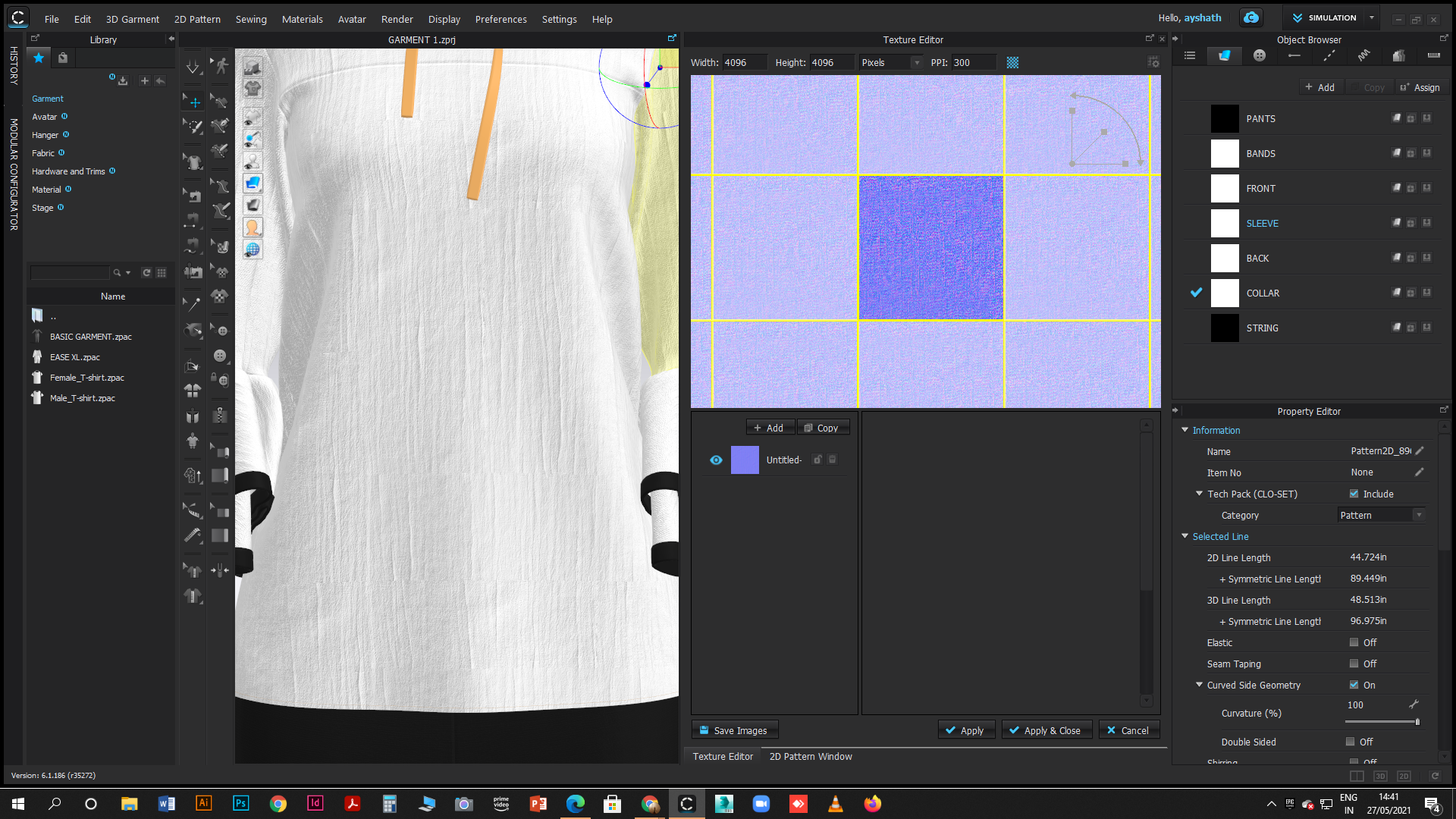
i created normal map in photoshop and opend in clo. normal map is showing tiled on the fabric.
-
Hi ayshath. Make sure you are adding the Normal Map to the area specified for a Normal Map. From your description above it sounds like you added it to Texture.
I have attached an image below for reference. You can also watch a video from our Tutorial section on our Youtube channel HERE which explains Normal Maps starting at the 6:00 minute mark.
0 -
Thanks for the reply
couldn't solve the issue.default normal map are working properly.the one i made in photoshop is showing in a tiled form. Attaching the google drive link,where i have uploaded normal map which i have created. https://drive.google.com/drive/u/0/folders/1MD1nKyv4LKZIQ_tR6zLy6Djy1hdro8Jp
thank you
0 -
Hi ayshath. Can you please attach a few full screen shots in CLO of the issue so we can see what is happening. Thank you
0 -
 0
0 -
Hi ayshath. The tiling that I am seeing is happening because the repeat that has been made is not seamless. You would need to work in Photoshop to edit the Normal Map and create a seamless repeat. CLO does not take a repeat and make them seamless so you will need to use another software to edit the map first if you do not want to see this grid.
0
Comments