Questions about Animation and Video Creation Tutorial

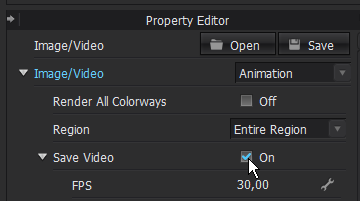
Hi. I watched "Animation and Video Creation Tutorial" from Clo-3D in youtube (https://www.youtube.com/watch?v=18dvBwxkAU8&t=510s) and I tried to follow the instruction on the video and render the animation. But why the files saved are in individual photos (png) instead of video format? Thanks :)
-
Hi bonniechanpy, I am happy to hear that you tried to follow one of our tutorials. In this case I can just imagine that you forgot to tick the box to save your video in the Image/Video Properties in the Property Editor.
 0
0 -
Thanks for the reply! I got it now! :)
0 -
Hi CLO Designers, I saw that video too and I have the same problem.
I have already tried to flag on "save video" but nothing changed.. Maybe i need to install other programs? I chose jpeg instead of png as a format, maybe that’s the problem?
Thank you
0 -
P.S. Forgot to say that I work on Windows 10 and have already installed Lagarith Lossless
0 -
Hi isabellaalessiit, you can try to make a turntable animation and see if that works. If a codec is not installed, the turntable video capture is unable to function. Please install a codec from the options below.
- Lagarith Lossless
- Xvid Mpeg-4.
With an installed codec the animation should work.
0 -
CLO Designers, I already have Lagarith and had the same problem, do I have to install Xvid Mpeg-4 and try again?
0 -
Hi isabellaalessiit, yes, please go ahead and try with Xvid Mpeg-4. I hope it will work then :)
0
Comments