CLO3D crashes when rendering

I've been running into a fairly frustrating issue.
CLO3D (v6.2) crashes when I render an animation of an avatar in a stage setting. It's happened three times and now
- The colourway is set to ‘current’ as in this version of CLO I cannot see where to switch it off.
- I'm using the trial version.
- I did notice the first time I rendered, there were over 300 PNGs that looked as though it would make up an entire video however, it stopped halfway through the catwalk as it crashed
Can anyone help?

0
-
Official comment
Hi shazp33,
it seems like your graphic card might have run out of VRAM, but to analyze this I would need further information about your graphic card and the amount textures and it´s file size.
However there´s something you can do:
Change the "Region" in your Image/Video Properties to "Play Region" and adjust the range of the blue bar in your timeline to the frame where you rendering has stopped.
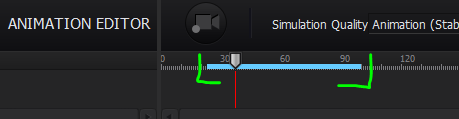
From there you can continue your rendering.
I hope this helps,
your CLO Team
Comments