move arrangement points to a different avatar 아바타 배치 포인트 이동

when you have multiple avatars, how do you set the arrangement points to the avatar you want to dress?
아바타 여러명 있을 때 어떻게 배치포인트를 입히고 싶은 아바타에 설정하나요?
0
-
Dear Clo Friend,
Open a Clo avatar on the 3D window. Add to the workspace your new avatar. They should be one on top of the other, both with the same pose. Delete Clo's avatar and the arrangement points will be placed on your new avatar automatically.
Another way is by accessing the top menu:
Go to Avatar > Auto Convert to Avatar. A pop-up window will appear.
Select your avatar file in 3D Body File. Next, select the Gender and keep Converting Option as Automatic.
In Converted Output choose Size Editable. Save and Convert.
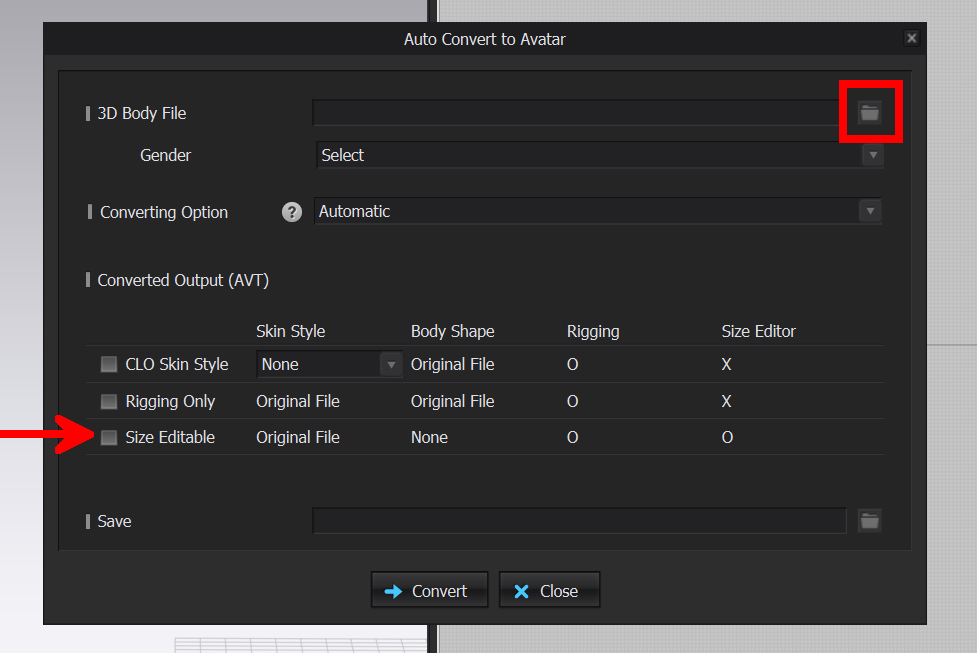
Hope it helps!
Best Regards.
0
Comments