line thickness

Hello,
I'm lost, I'm searching something that might be simple but can not find it. How to change the thickness of my pattern outlines ? I would like to print my pattern but with a thicker and darker outline and I do not find the way...
Many thanks for your help
-
Hi bigleralix,
thank you for reaching out.
To increase the thickness of your pattern outlines or change the appearance in color please go to Settings>User Settings>User Interface and scroll down to Appearance. Here you can change the thickness of your pattern outlines accordingly as on below screenshot.

I hope this helps, feel free to reach out if you have further questions.
BR
0 -
Hello,
Many thanks for your answer. That's exactly what I was looking for but unfortunately, I do not have this option on my Clo3d... I do not understand... That what my settings user looks like :
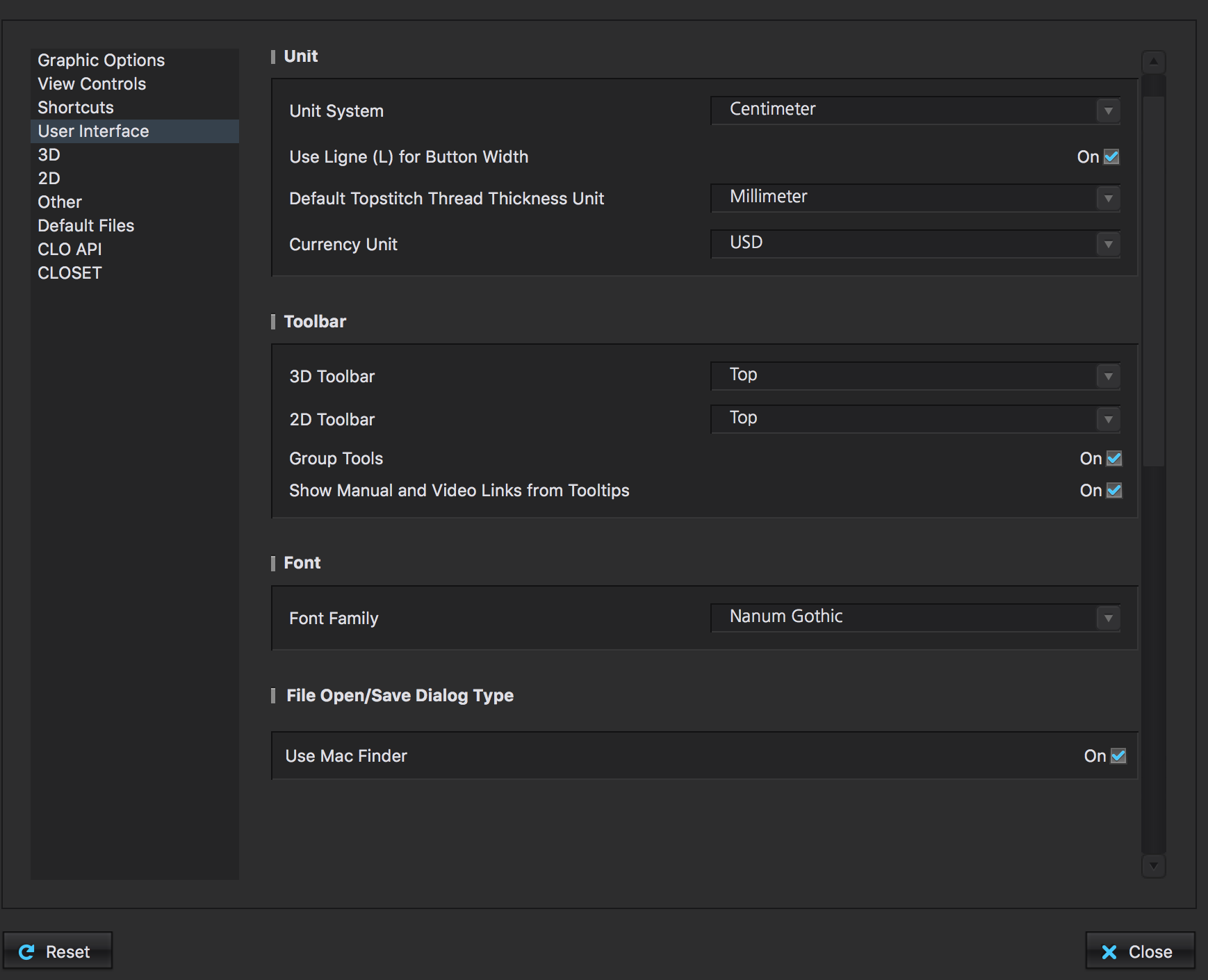
There is nothing after File/open...
Do you have an idea how to get appearance options ?
Many thanks,
Alix
0 -
Hi bigleralix,
to be able to see this option, please update to the newest CLO Version HERE. Once updated and in User Interface Settings, scroll all the way down to see this option.
Thank you and best regards
0
Comments