When rendering turntable or animation, CLO doesn't save the video

Hello all, I've been trying to animate a garment in CLO 3d and then render it but it doesn't save the video, just the images.

Does anyone know a solution? I have saved a video before, but it's not rendered, so it's not good enough
-
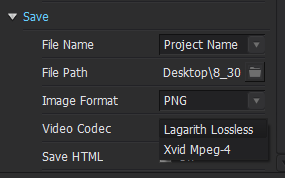
Hi Ilinca970. Your settings look good. There's some additional options below in the property editor. If video is checked, CLO should export all the individual frames/images in additional to the video.Also, double check where you are saving the video.
You can also download the video codecs: https://www.xvid.com/download/ which mat be able to help you.
 0
0 -
I have the same problem.
On screenshot is my settings.
File > Video Capture > Turntable
> Recording > Preview Turntable video Capture Window appeared > it shows my turntable video > I clicked Save
> in pop- up window I name my video and choose a place on my computer > I Click Save
> Blue bar appears that shows the progress of saving > when completed saving the bar disappeared >
> I check the folder where suppose to be my turntable video > folder is empty!!!!!!!!
 1
1 -
Hi, I am having the exact same issue. Has anyone figure this out yet?
1
Comments