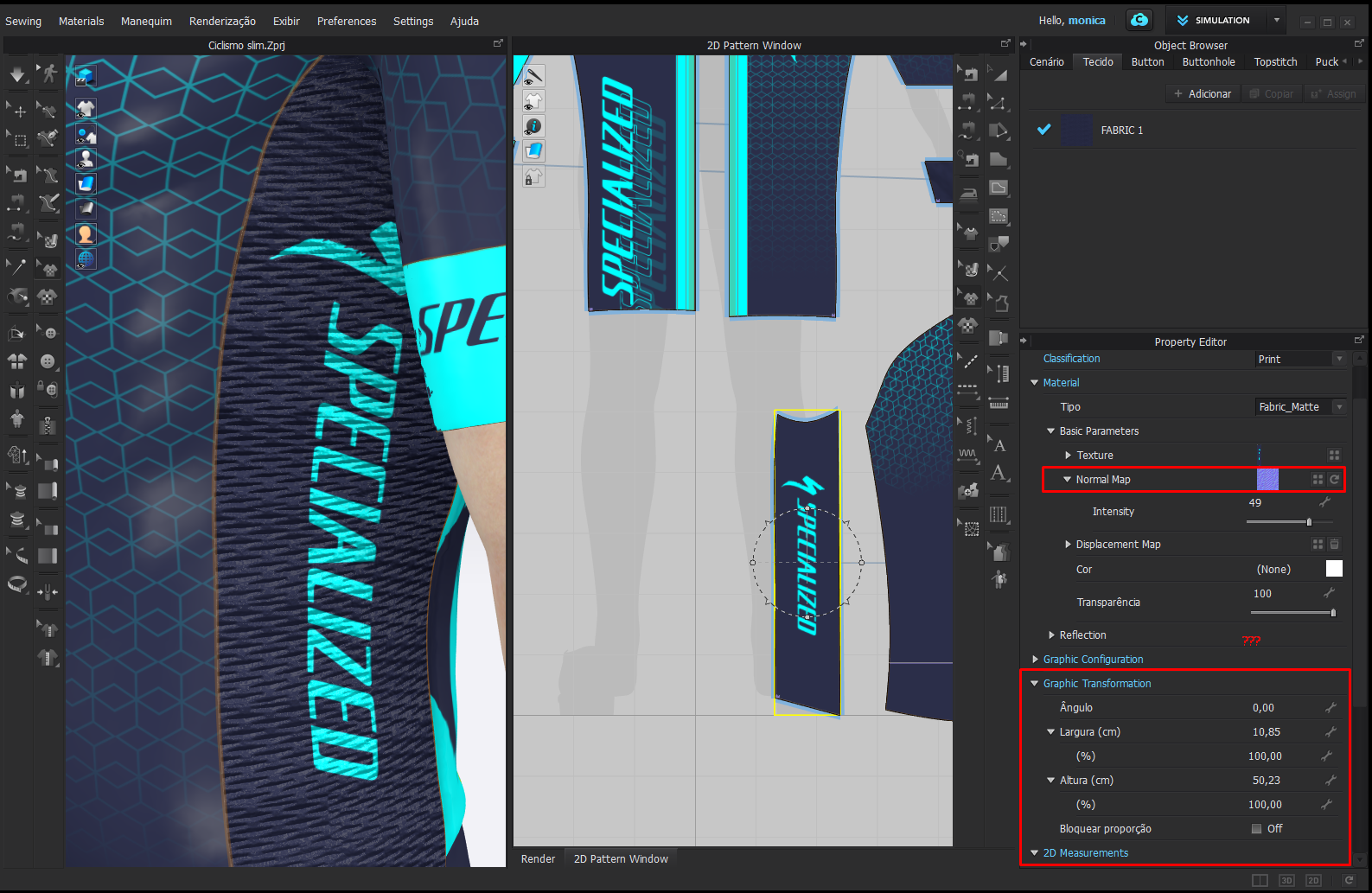
How can I edit the Normal Map proportions alone inside the Texture?

I can´t find the tool to edit normal map inside the texture in version 5.2.
Before we had two options: to edit normal map proportions in the fabric configs and to edit it in the texture configs when applied over the texture. But now this option over the texture seems to be not available anymore. There is the graphic transformation option, but it edits both (the texture and the normal map) at the same time!
Can anyone tell me how can I apply a map over my texture and edit its proportion in this version?
-
Hello mofabretti, I found this the hard way. There are no individual controls for displacement, normal or roughness maps within the graphics property editor. This works with fabrics only.
My suggestion is that your graphic is applied as the texture in the fabric that way you can add a normal map to each fabric type. You should create one fabric per fabric type that way you can use a normal map that corresponds to the side panels, or fronts, etc. You will have complete control over every parameter.
To position your texture use the (T) Transform Graphic Tool. You will have independent scaling for diffuse, normal, displacement and roughness maps.
You should prepare your graphics with the base color and logo outside CLO for this. One drawback with this is that you will have to prepare one graphic per color in the color way and replace the graphic in the colorway.
There are other techniques too which require you to create the normal map and the diffuse map (or roughness) in 1:1 scaling. That way when you plug in the diffuse and normal map back into CLO, you don't need to scale, only reposition the graphic. When you scale your graphic, the normal map is not affected. Something CLO might've overlooked. You can get real world scaling by exporting your patterns and using them as the base in Photoshop to add the diffuse and normal maps to the right scale.
I hope this helps,
P
0 -
Hello Pablo!
Thanks for the help. Is just that the former versions of the program had these options and were very useful to make the process faster.
We are in search of tools that can make the productive process faster for companies that use Clo as a tool, not only to sell more but to make the productive process faster. Here in Brazil Clo is largerly known within companies that produces customized uniforms and jerseys, and that uses sublimation as their main tool. Having the graphic within the pattern placed in the 3D, reduces loads of process and productive mistakes, but we need shortcuts to help reduce process inside the program.
As a user of 5 years now, it seems to me that with every upgrade of the program Clo is forgetting about that niche, focusing only in the fashion costumer, and it´s getting more and more difficult to simplify the process at each new version.
Well, sadly we´ll see what can be done with what we have.
Thanks anyway.
0 -
Yeah, I can't say for sure that the feature was or was not available in previous versions. Maybe someone else can confirm that here.
I'm not sure I follow on your comment about using the graphic in the 3D to reduce the load.
If you want to have the freedom of placing the graphic on top of the fabric and also, add a normal map (or other maps) to the graphic that is different than the normal map of the fabric, then the only way I see is to create the maps (normal and diffuse) outside of CLO using real world scale. That can be achieved by exporting the patterns or the UV map from CLO and using that as the guides in Photoshop. Create the diffuse and normal map to the scale you need in Photoshop, export using 72 dpi and then importing into CLO. That way both the diffuse and normal map will not need scaling and both will reposition together in 3D or 2D.
I see that what you need is possible, I'm not sure I'm being able to convey it to you.
P
0 -
Sports jersey productive process is crazy and we are searching for shortcuts to simplify that. I thought of all the alternatives mentioned above is just that they add one or two more processes to the thing and it was so easy before to just resize the normal map as we pleased
Also, Creating one fabric for each new pattern in order to apply a simple normal map over a graphic, reminding you that athletes jerseys have lots of little pieces, gives us a hand full. But I can see there´s no way out.
Thanks a lot for your suggestions and attention!! I´d love if you could send Clo´s team my considerations. =)
0 -
Well, maybe someone else here can share an easier way of doing it. Hold on tight!
0
Comments