How to import obj feather

I want to ask about my problem . When I import an obj fail (feather) as a garment or as trim it doesn't move. Please say what I need to do. Thank you.
-
Andrey, imported objects, either as a trim or an avatar it is not supposed to move. They are fixed and not affected by gravity by themselves. If a trim is glued to a piece of fabric, then it will be affected by gravity according to its weight.
Converting objects to garments will apply simulation as if it were a garment.
What are you trying to import the feather for?
0 -
Thank you Pablo. I'm trying to sew a feather on my hat. But when I import it as a garment it doesn't move and if I click trace in 2d clo freezes and crashes. If not click and load as a garment it still doesn't move. And it's too small and needs to expand it but if it doesn't trace in 2d I can't do this. Maybe you know-how I can made it?
0 -
Please share an image of what you are trying to do.
0 -
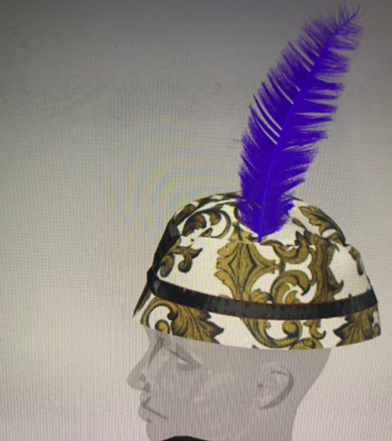
Like this but it doesn't move and no trace in 2d.
0 -
Making a feather with a realistic hair type of rendering in CLO, is definitely an advanced feature. You could try using hair and length maps inside CLO to create the tapering effect on the hair, and then use other maps for clumps.
Because the hair will grow out of a pattern piece you can stitch it to the head.
Not easy though. Why don't you read about hair in CLO?
0
Comments