ZFAB files error after update

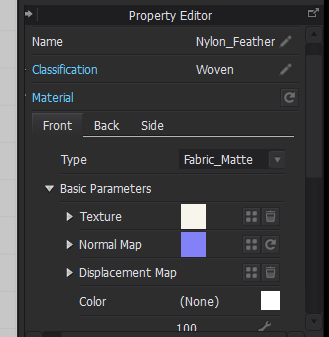
I recently update my CLO3D from version 5.1.436 to version 5.1.474. For a few days, I have been making clothes using the software. I noticed that whenever I was using the nylon featherweight fabric, it appeared to render correctly in CLO3D, but it doesn't render properly when I export the garment as obj and import it into blender. The fabric loses its properties such as opacity and color (also happens with silk taffeta). Which I thought was strange, because clothes that I had made before the update using nylon featherweight retained all of their properties when exported as an obj file into blender. I decided to uninstall and reinstall the update file. When I checked the fabric settings again, I noticed something different. Typically, when you open the nylon featherweight file from the .zfab files it shows up as name: featherweight classification: featherweight. After the update the classification shows up as woven and it no longer has a transparent mesh texture. The change log for the version update doesn't mention properties being changed for .zfab files so I'm wondering why this is happening all of a sudden.
-
Hello cookiepie97. I haven't upgraded to 5.1.474, and I'm still using 5.1.436. I checked the Nylon Featherweight and it appears as Classification: Woven.
Now to your comments about OBJ in Blender. First of all, I don't think the classification has anything to do in relation to the fabric's rendering properties. I believe it is just a simple category property to classify fabrics within CLO.
As to the opacity property of the fabric, this one is completely opaque (100% opacity) and the Featherweight_Nylon_FCL2PSN001_3_test1_COL which is the diffuse channel image, doesn't seem to have transparency.
Either way, the opacity property in CLO will not be exported when you do the OBJ export process. That is something you have to manually or procedurally recreate in which ever 3D software you are using outside CLO.
P
0 -
I was able to export my OBJ files properly and get the fabric to render correctly in blender. Thanks for responding.
0
Comments